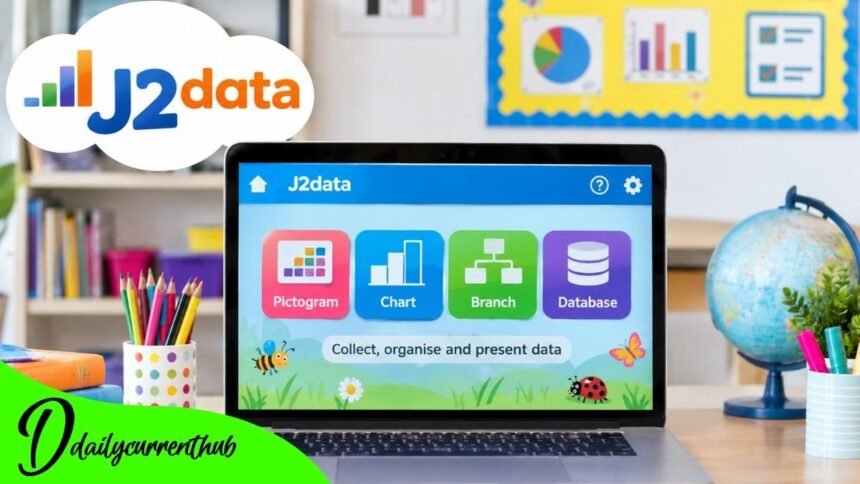
J2data is an online educational tool that makes collecting, organizing, presenting, and understanding data easier for primary school pupils. Developed by Just2easy, it provides interactive activities that help children explore information through pictograms, charts, branching databases, and searchable records.
Instead of introducing young learners to complicated professional database software, J2data offers age-appropriate tools that connect data handling with familiar classroom subjects. Pupils can work with information about animals, colors, geography, scientific observations, or other curriculum topics.
The platform supports the development of computing and mathematical skills while giving teachers practical resources for classroom activities. Its tools are intended to support data-handling objectives within England’s Key Stage 1 and Key Stage 2 computing curriculum.
This article explores J2data’s background, important features, educational applications, classroom collaboration, and practical value for pupils and teachers.
What Is J2data?
J2data is a digital learning resource that introduces children to essential data-handling concepts through interactive tasks. It forms part of the wider Just2easy educational environment, which contains tools for writing, programming, creative work, and classroom collaboration.
The platform teaches data through activities pupils can understand and manipulate. Younger learners can represent quantities using pictures, while older pupils can build structured databases, examine information, and generate charts.
The educational value lies in connecting an abstract concept—data—with visible, practical results.
For example, recording how many pupils prefer different fruits becomes more meaningful when those answers are represented in a pictogram. As learners progress, they can use tables and charts to make comparisons and support conclusions.
J2data is therefore not simply a graph-making application. It provides several ways to introduce how information is collected, classified, represented, and interpreted.
Detailed Overview of J2data
Background and Development of J2data
J2data is part of the Just2easy family of educational products. Just2easy develops digital learning resources that make technology accessible to teachers and children, particularly in primary education.
The company states that its software designers have been creating educational software since 1994. That history describes the wider organization’s experience rather than a confirmed launch date for J2data itself.
The product sits alongside other Just2easy resources, including creative tools, coding applications, and classroom productivity software.
Its design reflects a clear educational objective: pupils should be able to explore data without first mastering complicated menus or professional analytical systems.
The platform’s curriculum-linked lesson materials also set it apart from a typical charting application. Teachers can connect activities to specific learning objectives rather than treating graph creation as an isolated computer exercise.
How J2data Works in the Classroom
J2data offers several tools suited to different stages of learning. A teacher can select an activity based on the data-handling skill pupils are expected to practice.
At an introductory level, children may count familiar objects and represent their findings visually. More advanced activities can involve comparing different categories, organizing records, and searching databases.
The available tools support a progression from recognizing quantities to interpreting structured information.
Teachers can use prepared examples or develop activities around topics already being studied. For example, a class examining the natural world could organize observations into categories and discuss patterns in the results.
These activities also provide opportunities for questioning. Pupils can be asked which category has the largest total, what a graph reveals, or whether a particular conclusion is supported by the data.
The software helps present information, but discussion of the results remains an essential part of learning.
J2data Pictogram: Learning Through Pictures
The Pictogram tool provides a visual introduction to data handling, particularly for younger children.
Pupils can choose from familiar topics, use existing pictures, or create their own images. They can then add or remove symbols to represent quantities in different categories.
Imagine a class investigating favorite fruits. Children could record votes for apples, bananas, and oranges, then represent the totals using pictures.
The resulting display allows learners to compare quantities visually.
This approach helps establish several foundational concepts, including categorization, counting, comparison, and the relationship between information and its representation.
It also creates opportunities to discuss accuracy. A pictogram is useful only when the symbols correspond correctly to the collected information.
Children can learn to identify mistakes, check totals, and explain what their completed displays show.
These are basic skills, but they establish important foundations for later work with graphs and numerical data.
Creating and Understanding Charts with J2data
As pupils become more confident, the Chart tool introduces additional ways of presenting information.
According to Just2easy’s product documentation, the application supports line, block, pie, and bar charts.
Users enter information into a table, and the selected chart updates as the underlying figures change.
This connection between numerical entries and visual presentation makes it easier to explore how different representations communicate information.
A bar chart can help compare separate categories, while a line chart may be appropriate for showing changes across a sequence of measurements.
However, selecting a chart should involve more than choosing an attractive design. Pupils need to consider what type of information they have and which representation communicates it accurately.
For teachers, this creates a practical opportunity to develop data interpretation and critical thinking alongside computer skills.
J2data Branch: Developing Logical Thinking
The Branch tool introduces pupils to branching databases through classification and yes-or-no questions.
Children begin with a collection of images or words and identify characteristics that distinguish one item from another.
For example, an animal activity might use questions about feathers, wings, or other observable features.
Each answer leads to another stage of the classification process until a particular item is identified.
Just2easy explains that completed branching databases can be played interactively, allowing users to follow the questions and reach a matching result.
This activity develops more than basic knowledge of databases. It encourages children to identify properties, construct meaningful questions, and organize information logically.
A poorly chosen question may fail to distinguish items effectively, while a carefully designed sequence creates a clearer classification system.
That process helps pupils understand how structured decisions can be used to organize and retrieve information.
J2data Database: Organizing and Analyzing Information
The Database feature introduces older learners to a more structured approach to information management.
Pupils can create records containing different fields, including text, numbers, dates, and other supported data types.
The database interface offers Form, Table, and Chart views. Form View supports entering and inspecting individual records, while Table View displays information in a structured arrangement.
Chart View allows users to represent selected data visually.
The platform also supports searching and filtering, including more detailed queries using multiple conditions.
For example, a database about animals might contain fields describing habitat, diet, and physical characteristics. Pupils could search for animals matching specific conditions and examine the results.
This introduces an important principle: a database is valuable because information can be organized and retrieved systematically.
It also demonstrates why the accuracy and consistency of individual records matter.
Collaboration and the Role of Teachers
J2data includes collaborative database functionality that allows pupils and teachers to contribute to shared collections of information.
According to Just2easy’s support documentation, users can share databases with classes, groups, or selected individuals. Sharing permissions include options for editing and viewing.
These controls support different classroom activities. A teacher might prepare a database structure and allow pupils to contribute observations, while restricting editing when the completed results are being reviewed.
Collaboration introduces additional responsibilities.
Students need to agree on what information to collect, use consistent categories, and check that records are entered correctly.
Teachers can then guide discussions about the combined results, including patterns, inconsistencies, and possible errors.
The platform provides technical features for cooperation, but meaningful collaborative learning still depends on clear instructions and appropriate supervision.
Supporting the National Curriculum
J2data’s official product information states that its tools address the data-handling elements of England’s Key Stage 1 and Key Stage 2 computing programs of study.
Its associated resources include lesson plans, instructional videos, and example databases.
This curriculum connection gives teachers a practical starting point when introducing data-related concepts.
The educational progression can begin with counting and pictograms before moving towards charts, branching structures, and more detailed database activities.
J2data also supports learning beyond computing.
In mathematics, pupils can compare numerical results. In science, they can classify observations. In geography, they can organize information about places or environments.
The same digital skills can therefore be applied to several subjects.
Published school computing plans also identify J2data tools for activities such as pictograms, branching databases, and flat-file databases, demonstrating how schools incorporate the software into teaching sequences.
Responsible Data Handling and Digital Safety
Learning to work with information also involves understanding how it should be handled responsibly.
J2data’s collaborative database functions include configurable sharing permissions, which can help teachers manage who can view or edit a particular activity.
However, those features do not eliminate the need for proper classroom safeguards.
Teachers should avoid placing unnecessary personal information about children in learning databases. Activities involving animals, fictional examples, or anonymized class responses can often achieve the same educational objectives.
Accuracy also matters. Pupils should understand that charts and databases reflect the information entered into them; incorrect records can produce misleading results.
A useful classroom practice is to compare the original observations with the final chart or table.
This develops responsible habits that remain relevant when pupils encounter more advanced digital systems.
Educational Value and Future Relevance of J2data
J2data’s significance comes from the way it combines practical computing tasks with broader classroom learning.
Its tools introduce concepts that remain useful beyond primary school: classification, structured records, graphical representation, searching, filtering, and interpreting evidence.
The platform does not replace the teacher’s role in helping pupils understand these concepts. Instead, it provides an interactive environment in which children can practice them.
Its range of tools also allows educators to select activities appropriate to different learning stages.
You don’t need to predict future releases or unannounced developments to understand its educational relevance.
As long as collecting, questioning, and interpreting information remain part of the curriculum, activities built around those principles have a clear purpose.
The lasting value of J2data lies in helping pupils see data as something they can investigate and understand, rather than simply numbers placed in a table.
Conclusion
J2data provides a structured and accessible introduction to data handling for primary school learners. Developed by Just2easy, it brings together pictograms, charts, branching databases, and database management within an educational platform.
Its features support both introductory activities and more complex investigations, allowing pupils to practice collecting, classifying, organizing, and interpreting information.
The inclusion of lesson materials and examples gives teachers resources for connecting these activities to curriculum objectives.
Collaborative database features also offer opportunities for shared classroom projects, provided that information is managed responsibly.
Perhaps the platform’s greatest practical strength is its ability to make abstract data concepts visible. Children can enter information, examine the resulting charts, test classifications, and discuss what their findings mean.
Used alongside thoughtful teaching and critical discussion, J2data can help build the foundational analytical and digital skills that pupils need as their education progresses.
(FAQs)
1. What is J2data used for?
J2data teaches pupils to collect, organize, represent, search, and analyze information through educational tools such as pictograms, charts, and databases.
2. Who developed J2data?
J2data is developed by Just2easy Ltd., a company specializing in educational software and digital classroom resources.
3. Is J2data suitable for primary school children?
Yes. Its tools support different stages of primary education, including Key Stage 1 and Key Stage 2 data-handling activities.
4. What are the main features of J2data?
Its main features include Pictogram, Chart, Branch, and Database, along with instructional resources and examples.
5. Can students create graphs using J2data?
Yes. The Chart tool supports line, block, pie, and bar charts, allowing pupils to represent information visually.
6. Does J2data support collaborative learning?
Yes. Its database functionality allows selected users to share and work with information, with configurable viewing and editing permissions.
7. Is J2data free to use?
Just2easy advertises a 30-day free trial of its ToolSuite. Ongoing access and purchasing arrangements should be checked through the provider or participating school.
8. How does J2data support digital literacy?
J2data helps pupils practice organizing information, identifying patterns, interpreting charts, searching records, and using digital tools to investigate questions.