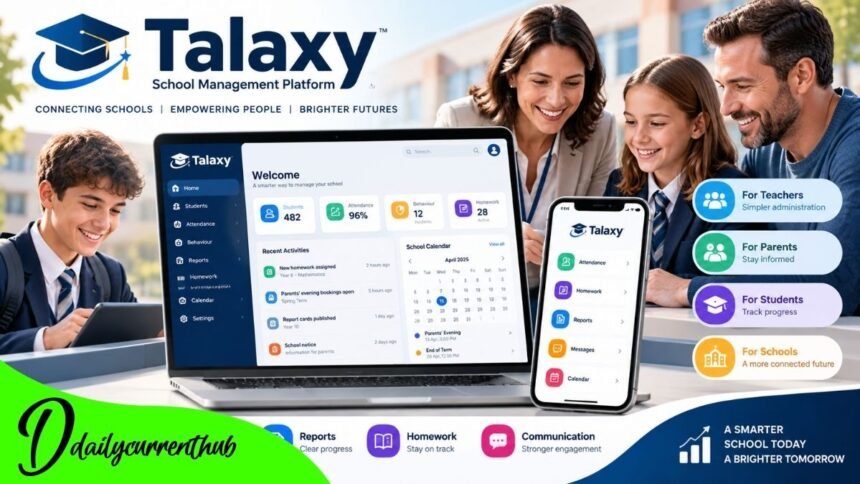
Schools depend on accurate information, efficient administration, and effective communication between teachers, parents, and students. From monitoring attendance to distributing academic reports, educational institutions manage a large volume of information throughout the school year. When these responsibilities are spread across different systems, everyday tasks can become unnecessarily complicated.
Talaxy is a cloud-based school management platform developed by TASC Software Solutions Ltd, a UK educational software company. Designed for schools, academies, and other educational institutions, the system combines academic administration, communication, and pupil information management within a connected digital environment.
Rather than operating as a conventional learning website, the platform provides practical tools to help schools manage daily responsibilities while giving authorized parents and students access to relevant information.
This article explores Talaxy’s background, principal features, school management tools, login process, data protection considerations, and its growing role in digital education.
What Is Talaxy?
Talaxy is a digital school management system that brings together several administrative and educational functions. Its tools support activities such as recording student attendance, managing behavior information, tracking academic performance, distributing homework, and communicating with families.
The platform follows a modular approach, so schools can choose individual tools to meet their needs rather than adopting every available feature.
This flexibility matters because educational institutions differ in their administrative structures, budgets, and communication needs.
For teachers, the system provides a way to maintain classroom records and access pupil information. For parents, it offers an organized view of school updates and academic information. Students can use relevant features to follow their timetables, assignments, and progress.
Its central purpose is to reduce the difficulties associated with managing separate information systems.
Background and Development of Talaxy
The Company Behind the Platform
Talaxy was developed by TASC Software Solutions Ltd, a British company specializing in software for educational institutions. The company has a background in pupil data management and provides solutions designed to support school administration.
Educational industry coverage publicly described the platform in September 2020, though that date should not be confused with a confirmed initial launch date.
The development of cloud-based school software reflects broader changes in education. Schools increasingly need systems that provide timely access to information without depending entirely on paper documents or individual office computers.
Talaxy addresses this requirement by combining several management functions within a web-based environment that can be accessed by different authorized users.
How Talaxy Works
The platform operates through an internet-connected interface, allowing schools to provide access to staff, parents, and students.
Different users see information relevant to their permissions and responsibilities. A teacher might work with class registers, while a parent may see attendance records and reports associated with their child.
Talaxy also connects with existing Management Information Systems (MIS), supporting information exchange between systems.
This arrangement can help schools minimize repeated data entry. However, available functions depend on the selected modules, the school’s configuration, and its existing technology.
School Administration and Classroom Management
Attendance and Behavior Monitoring
Attendance is one of the most important responsibilities in school administration. Accurate records help staff identify absences, monitor punctuality, and respond when pupils require additional attention.
Talaxy includes tools for attendance registration, recording absence reasons, and reviewing relevant information.
Teachers can also use its behavior management features to document achievements, incidents, and disciplinary actions in line with school policies.
The system supports positive recognition alongside behavior records, giving educational institutions a broader view of pupil conduct.
For school leaders, having this information in a connected environment can simplify reviewing individual records and identifying patterns that may require intervention.
Classroom Organization and Assessment
The software includes features for seating plans, assessment grades, report cards, lesson planning, and other classroom information.
These tools are intended to help teachers manage information that would otherwise be maintained across separate applications.
For example, seating arrangements and class records support classroom organization, while assessment information helps educators review academic progress.
Digital systems do not replace professional teaching judgment. Their value lies in making relevant records easier to access and maintain, allowing teachers to concentrate on the educational decisions that matter.
Parent Communication and Engagement
Connecting School and Home
Effective communication between families and schools is central to a student’s educational experience.
Talaxy provides a parent portal where authorized parents and carers can view information shared by their child’s school.
Depending on the school’s setup, this may include attendance records, school reports, behavior updates, homework, notices, and important documents.
The platform also supports communication tools such as email, notifications, and selected messaging functions.
For working parents or families managing multiple responsibilities, online access makes it easier to review relevant school information without relying solely on printed letters.
Parents’ Evenings and School Updates
The platform offers modules for booking parents’ evenings, allowing participating schools to schedule appointments and share meeting information.
It also supports administrative activities such as forms, surveys, event bookings, and absence reporting.
However, not every school using Talaxy necessarily enables these features. Some institutions still use separate services for certain activities.
The practical benefit therefore depends on how extensively each school has implemented the available tools.
Student Learning and Academic Progress
Access to Homework and Timetables
Students benefit when assignment information, timetables, and school communications are presented clearly.
Talaxy offers tools for homework management, quizzes, academic reports, and other learning-related information.
Where enabled, students can review assignments and use the platform to understand what work has been set.
Parents may also be given access to relevant academic information, supporting conversations about progress and school responsibilities.
These features can improve visibility, although successful learning still depends on teaching quality, student participation, and appropriate support at home.
Understanding Academic Performance
The assessment and reporting functions help schools organize information about pupil achievement.
Rather than replacing teacher feedback, digital records provide a structured way to share selected results and progress updates.
When schools use these tools consistently, they may make it easier for students and families to understand academic expectations and identify areas requiring additional attention.
The accuracy of those insights depends on the quality and timeliness of the information staff enter.
Talaxy Login and Account Access
How Parents and Students Sign In
The educational institution generally arranges access to Talaxy.
Participating schools commonly provide a dedicated school-specific portal and registration instructions.
Parents may receive an invitation at the email address registered with the school. Once their account has been verified, they can sign in using the supported authentication method.
Some schools also offer sign-in options connected to services such as Google or Microsoft.
Students normally receive access instructions from their school, and their available features may differ from those provided to parents or staff.
Using the correct school portal is essential because searching for Talaxy online may lead to another institution’s login page.
Mobile and Desktop Accessibility
Talaxy operates as a cloud-based web application and is also described by participating schools as a Progressive Web App (PWA).
This lets users open their school portal in a compatible browser and, on supported devices, add it to their home screen.
The approach offers convenient access without requiring a conventional app-store installation.
Users experiencing registration or login problems should consult their school’s published instructions or contact the responsible school administrator.
Privacy and Data Protection
Protecting Student Information
School management systems handle personal information that requires careful protection.
Attendance records, academic reports, contact details, and behavioral information must be managed with appropriate safeguards and authorized access.
TASC Software publishes a GDPR compliance statement explaining its approach to information security and data protection.
According to its December 2025 statement, the company acts as a data processor for customer information, while schools generally act as data controllers.
The company states that its measures include encryption, access controls, audit trails, and UK-based hosting.
These published commitments provide useful information about the provider’s stated practices, although they should not be treated as an independent security audit.
Why Responsible Access Matters
Digital convenience must be balanced with privacy.
Schools remain responsible for determining appropriate access permissions, maintaining accurate records, and explaining how pupil information is used.
Parents and students also have responsibilities, including protecting account credentials and accessing information through trusted school channels.
A well-managed system can support communication without making sensitive pupil information publicly accessible.
Benefits and Practical Limitations
Why Schools Choose Modular Software
One defining feature of Talaxy is its modular structure.
Schools can select tools for their immediate needs and add other modules later.
This approach may reduce the need to maintain multiple separate applications and can make administrative processes more consistent.
In published user reviews, school staff describe benefits such as reduced paperwork, easier behavior management, and improved communication.
These experiences are useful examples, but they do not guarantee the same outcomes at every institution.
Challenges Schools Should Consider
Introducing any school management platform requires planning.
Staff may need training, records must be maintained accurately, and administrators must decide which information different users can access.
Families also need clear guidance about registration, notifications, and technical support.
Reliable internet access is another practical consideration for a cloud-based system.
Talaxy’s effectiveness therefore depends not only on its features but also on implementation, school policies, data quality, and everyday use.
The Future of Talaxy and Digital Education
Education continues to rely on digital systems for communication, information management, and administrative coordination.
Platforms such as Talaxy illustrate how these responsibilities can be brought together within a connected environment.
Its modular design lets schools select functions as their needs change, while integration with management information systems remains a key part of its offering.
Future improvements across school management technology may focus on accessibility, reporting, automation, and more efficient communication.
However, specific future features or release dates should not be attributed to Talaxy without an official announcement.
The platform’s long-term value will depend on how effectively it continues to serve schools, staff, students, and families.
Conclusion
Talaxy is a school management and communication platform designed to support the daily operations of educational institutions. Developed by TASC Software Solutions Ltd, it combines attendance, classroom records, academic reporting, behavior management, homework, and parent engagement.
Its modular structure lets schools choose tools to fit their needs, while cloud-based access makes relevant information available to authorized users across devices.
For teachers, the platform can help organize administrative responsibilities. For parents and students, it offers a clearer way to access selected school information and follow educational progress.
Its effectiveness ultimately depends on thoughtful implementation, responsible data management, and consistent use.
As schools continue developing their digital infrastructure, Talaxy offers one approach to more connected administration and more manageable day-to-day school communication.
(FAQs)
1. What is Talaxy used for?
Talaxy supports school administration, pupil attendance, behavior management, academic reporting, homework, and communication between schools and families.
2. Who developed Talaxy?
The platform was developed by TASC Software Solutions Ltd, a UK educational software company based in Wolverhampton.
3. Is Talaxy available to parents?
Yes. Parents and carers can access the platform when their child’s school provides an authorized account.
4. How do I log in to Talaxy?
Use the dedicated portal your school provides and follow its registration or login instructions.
5. Can students use Talaxy for homework?
Yes. The platform includes homework and assignment tools, but availability depends on the features the school enables.
6. Does Talaxy work on mobile phones?
Yes. It is accessible through compatible web browsers and can be added to the home screen on supported devices.
7. Is Talaxy designed to protect personal information?
TASC Software publishes data protection policies and describes safeguards including encryption, access controls, and UK-based hosting. Schools are also responsible for appropriate data governance.
8. Is Talaxy free for schools?
Talaxy is commercially offered to schools through a modular pricing approach. Exact charges depend on the services selected and the provider’s quotation.